OK. So here is a little resume of my process to make PCB with my crap of a CNC.
I'm using freeware version of Eagle to make the schematic and board and then I use pcb-gcode plugin to generate the gcode for the milling.
My steps are these:-Make the schematic and board in eagle.
-After all is in place use the Drc tool in eagle to check your clearances. To do this go to the clearances tab of the Drc tool and set all clearances according to this formula:
Minimum clearance = tool width + (2 * safety offset from pad/via distance)
Why?
Because using the same formula in the pcb-gcode plugin will allow you to make the PCB using 2 passes (making a PCB in a single pass doesn't always ensure proper isolation and almost always needs deburring and more the two passes is excessive and time consuming). The 2-pass isolation has yield the best results for me with a 10º v carbide bit. I'm still waiting for the 60º bit. I'm hopping it can produce similar results with a single pass. For now I'm sticking with 2.
The above formula is a reference and should be used has a reference only. If overlay occurs it's not the end of the world. The amount of overlay is the problem. Some SMD components might not even comply with the clearances. It's OK. But you should check the generated gcode for those places to see if they where properly isolated.
-Next configure pcb-gcode plugin. If you are going to work in metric units (mm) change the gcode-defaults.h in the setting folder of the pcb-gcode plugin to output the coordinates with only 3 decimal places after the floating point.
This is done by changing this line:
string FORMAT = "%-6.4f "; /* coordinate format */
To:
string FORMAT = "%-6.3f "; /* coordinate format */
Milling depth = -0.05mm
Remember most copper sheets in raw PCB is 35 microns (0.035mm). 0.05mm should be enough without going too deep.
Tool width = 0.2mm.
In my case I'm using a 0.1mm v-bit 10º. I set this to 0.2mm to compensate for run-out, vibration and bit wobbling (being such a thin bit it bends while trying to remove the copper. It's like forcing a needle to scratch a surface. Bending will occur. Also must compensate for the widening of the tip as it goes deeper.
Default isolation = 0.15mm
this is an other place where you can compensate for all the variables above. I prefer not to do it here. In here I like to put the amount safety margin to apply to pad/via clearance.
Isolation step <= Tool width.
Maximum isolation = Default isolation + Isolation step.
This insures 2-pass milling.
Don't forget to set the feeding speed. I'm using between 60 and 100mm/min. Faster then that bits will brake, deformations in isolation will be produced and you don't want that.
-After a good gcode is achieved It's milling time. Secure the PCB to the table in a way that avoids (un)leveling (usually the PCB is not perfectly flat due to storage conditions).
Two ways to do this.
The pro way. Use a vacuum table.
The cheap and dirty (but totally works). Double side scotch tape. This the one I use. It works (period). Read this.
Home the bit with one of the to procedures I've mentioned in a early post (Eagle2GCode - Part 2).
And you are good to go. You should be ready to start milling.
Good luck.
Thursday, August 23, 2012

Tuesday, August 7, 2012
Eagle 2 GCode - Part 2
OK seems my early considerations where partially wrong. The depth of the engraving bit must be ~0.05-0.06mm.
My initial considerations where wrong because I was not homing the bit properly.
Homing method 1 (cheap and dirty) - Use an power source of some kind to drive an LED (in series with a resistor if not adequate to drive the LED directly) and use the contact between the bit and the raw copper as a switch to indicate if there is contact between both.
Here is a schematic.
Homing method 2 (more precise) - Exactly the same but using on of inputs in the CNC control board/Software.
Note: For some reason the EMC 2 is rounding my GCode floats to the 0.1mm scale. Don't know why this is happening but I'm upgrading to EMC 2.5.0 seems to have fixed it. Also I had to reconfigure the gcode-default.h file of the pcb-gcode script to write floats with 3 digits after the dot separator. This prevent rounding errors of the gcode interpreter in the EMC 2 reported in arc movements in mm units.
This is a picture of my first trials.
These are my SMD trials (just a simple SOIC8 circuit and a resistor)
Here are a few videos from the machine working.
Despite the results are not perfect I'm getting pleased with it. There are still a lot of headroom and some tricks in my sleeve to improve this with minimal changes.
Let's see how far I can take this.
My initial considerations where wrong because I was not homing the bit properly.
Two ways to home the bit (that are actually almost the same).
Homing method 1 (cheap and dirty) - Use an power source of some kind to drive an LED (in series with a resistor if not adequate to drive the LED directly) and use the contact between the bit and the raw copper as a switch to indicate if there is contact between both.
Here is a schematic.
 |
| Homing detection schematic |
Homing method 2 (more precise) - Exactly the same but using on of inputs in the CNC control board/Software.
Note: For some reason the EMC 2 is rounding my GCode floats to the 0.1mm scale. Don't know why this is happening but I'm upgrading to EMC 2.5.0 seems to have fixed it. Also I had to reconfigure the gcode-default.h file of the pcb-gcode script to write floats with 3 digits after the dot separator. This prevent rounding errors of the gcode interpreter in the EMC 2 reported in arc movements in mm units.
This is a picture of my first trials.
 |
| From left to right - 1st attempt had a bad configuration was doing it half sized, next is 1,2mm deep with multiple passes (excessive), next reduced number of passes (still excessive), next at 1mm with one pass (still excessive but acceptable). |
These are my SMD trials (just a simple SOIC8 circuit and a resistor)
 |
| 1st SMD trial |
 |
| 1st SMD trial detail (depth 0.075mm to deep in the majority of the circuit) |
 |
| 2nd SMD trial detail (depth 0.05mm to shallow in some places) |
Here are a few videos from the machine working.
Despite the results are not perfect I'm getting pleased with it. There are still a lot of headroom and some tricks in my sleeve to improve this with minimal changes.
Let's see how far I can take this.
Friday, August 3, 2012
CNC Control Software
For the CNC control software I've chosen the LinuxCNC. It's free, open source, easy to configure and use, and there's a huge community that continuously improves it. There's a ton of documentation about how to configure this software but the quick guide is a good place to start.
For the PCB machine code generation I user the free version of Eagle PCB and the awesome pcb-gcode plugin.
The sync tuning of these two tools can do all the difference between a nice clean PCB and a bad one.
I'll keep dumping my tune-up's here, along with pics of the results.
Cheers.
For the PCB machine code generation I user the free version of Eagle PCB and the awesome pcb-gcode plugin.
The sync tuning of these two tools can do all the difference between a nice clean PCB and a bad one.
I'll keep dumping my tune-up's here, along with pics of the results.
Cheers.
Thursday, August 2, 2012
Eagle 2 GCode
I'm now in a test and trial fase for achieve good PCB boards with my CNC.
After 2 kind of failed circuits, here are my early conclusions:
Engraving at 0.2mm depth is to much. 0.1mm is to shallow in some areas due to CNC table alignment defects and the PCB raw sheet defect (it’s not perfectly flat since the board may be bend due to incorrect storage positions and handling). 0.12-0.15mm should yield the best results (still to be tested).
I'm using a 0.1mm 10º V carbide bit to do routing isolation. Applying the formula for the cutting tool wide in this wiki I should consider a minimum tool size (width) setting of 0.15-0.2mm (that also compensate the above errors plus spindle and bit run out).
To keep it simple and fast I’ll be only performing the isolation routing and skip the copper removing in bigger areas. For this pcb-gcode plugin for Eagle should have the following configs:
Tool depth for isolation and Z Down - 0.12-0.15mm (value to be tested) (Z Down is negative)
Default Isolation (*), Maximum Isolation and tool Size – 0.15-0.2mm (this will insure a single passage – the isolation routing passage).
(*) Default Isolation is the tool offset from the track. For best results this should be the same as the tool size. ALWAYS do the Clearence check in the DRC tool of EAGLE. Set the DRC checking rules in the Clearence tab to at least 2xDefault Isolation + 1xTool Size. This checks for error of overlapping that otherwise may result in the isolation routes not being generated.
Also using Voronoi-Regions gcode generetor software can be a good solution to maximize copper area and conductivity.
I’ll test some more and post the results later.
After 2 kind of failed circuits, here are my early conclusions:
Engraving at 0.2mm depth is to much. 0.1mm is to shallow in some areas due to CNC table alignment defects and the PCB raw sheet defect (it’s not perfectly flat since the board may be bend due to incorrect storage positions and handling). 0.12-0.15mm should yield the best results (still to be tested).
I'm using a 0.1mm 10º V carbide bit to do routing isolation. Applying the formula for the cutting tool wide in this wiki I should consider a minimum tool size (width) setting of 0.15-0.2mm (that also compensate the above errors plus spindle and bit run out).
To keep it simple and fast I’ll be only performing the isolation routing and skip the copper removing in bigger areas. For this pcb-gcode plugin for Eagle should have the following configs:
Tool depth for isolation and Z Down - 0.12-0.15mm (value to be tested) (Z Down is negative)
Default Isolation (*), Maximum Isolation and tool Size – 0.15-0.2mm (this will insure a single passage – the isolation routing passage).
(*) Default Isolation is the tool offset from the track. For best results this should be the same as the tool size. ALWAYS do the Clearence check in the DRC tool of EAGLE. Set the DRC checking rules in the Clearence tab to at least 2xDefault Isolation + 1xTool Size. This checks for error of overlapping that otherwise may result in the isolation routes not being generated.
Also using Voronoi-Regions gcode generetor software can be a good solution to maximize copper area and conductivity.
I’ll test some more and post the results later.
Saturday, July 28, 2012
Wah Wah Mods analisys
A couple of years ago I (re)started my guitar playing only to put it aside (dam Battlefield :-P). In that intense rebirth of the guitar passion a acquired a couple of guitar pedals and was even building one of my one.
One of the pedals I bought was a Wah Wah Dunlop GCB 95 pedal with the clear mission of modding the hell out of it.
I never even got it out of the box until recently...lol.
Since I'm into a slow comeback to the electronics field I decided to resume this small project.
I’m not going to explain how the Wah filter works. You can read it in this nice article, but in resume it’s a low pass filter with a peak on the cut-off zone of the response frequency curve (bode diagram). This reproduces somewhat a kind of vocalization of a “wwaaahhh” sound.
The wah circuit is pretty much the same across all pedals, with slight component variations. It uses a kind of LC filter with a circuit that reproduces a variable capacitor (what makes the filter move forward and backward is this C variation).
Here are some pictures of my GCB 95 circuit board (this is the I version and I believe the latest).
There are a lot of mods on the web so I decided to analyse them before grabbing the iron.
True bypass mod
Vocal mod
Gain and volume mod
Mid range mod
Sweep range mod
FatWah mod
Transistor mod
Buffer mod
I’m using LTSpice to simulate de circuit. I’ll be basically be looking at the bode diagram (frequency response) of the circuit. I will not show how the mods are done since you can Google it. There's tones of articles explaining what to do. Next I'll present my findings.
Note: All the following diagrams will be present in relation to the original circuit. This means all the mods a showed alone (one at the time). At the end I'll combine the ones I'll most probably implement. All the simulations where done with the pedal value at one of the ends (heel down - the woo part of the wah sound).
This actually is the only I did not simulate. It made some confusion in my mind for the first 2 minutes but after reading this article it all became clear.
Since the signal is not totally disconnected/separated (just the output is routed via a SPDT) you will end up with and filter in the way of guitar signal. That filter produces the effect known as “Tone-sucking”. Basically it filters a portion of the original sound muting some of the frequency components of the sound (usually the low and/or high end of the signal’s frequency).
Input buffering resides in putting a high/input and low/output impedance between the signal to allow the effect circuit to draw more current from an outside source and spare the weak signal from the guitar. This is applied not only for isolation of circuitry but also to “give new life” to the original signal, when this runs through long cables (the longer the cable the more resistance exists which makes the signal weaker). See good buffers here (JFET are my favourite It makes the guitar very alive).
True bypass is just that The signal is completely shut of from the effect pedal, by input and output routing. There are several articles about doing this, some removing the input buffer and other keeping it. I chose to keep it because of the next mod.
So this is one I should do.
This is not very known and probably one of the most dramatically changing mods for wah pedals (from an analytical point of view), strangely not mentioned in many mod articles probably because it requires the buffer stage used in the GCB 95(luck me :-D).
First lets take a look at the original frequency response of my GCB 95.
As you can see the response is very more or less what you expected (if you read the wah explanation article). The only thing odd is the lower end of the frequency seems to be quite low (-16Db @ 110 Hz – A2 note playing a loose 5th string guitar in standard tuning I believe). The peak sits near 440Hz (A4).
Doesn't seem so much like the theoretical wah filter showed in the article right? Actually it's no wonder this happens. When you plug you wah pedal the sound of your guitar gets "thinner". This happens because the lower frequency spectrum of the signal is being getting attenuated.
So what does the Fatwah does to the signal. Lets look.
Amazing!! The lower frequency range got a nice bost. The down side (from the graphical analysis) is that the "fatness" came at the cost of some vocal strength of the wah due to the reduction in the Q.
never the less the sound should become much more "full".
This mod changes the Q of the filter making the "hump" of the signal more pronounced. This makes the wah more vocal.
I will not apply this one for a single reason. It's already in the GCB 95. Changes the Q less then the vocal mod but is not negligible. The wave signal change is similar to the vocal mod but less strong.
This actually makes the "hump" slide in frequency. This is the tuning point for your wah. I read in a post in a forum that the sweet spot for a wah pedal is between 440Hz (A4) and 1760Hz (A6) (to octaves apart. This may be needed if your wah sounds dull. The inductors mounted on these puppies suffer from large factory tolerance (ranging from 300mH to 650mH). To tune it you can unsolder the inductor, measure it, calculate/simulate the best value for this capacitor and change it (by adding parallel or series to the original if needed). This is also used to change (a higher value) the wah to a bass wah.
I've simulated with a pair of BC109C. This changes the signal slightly. Makes the Q higher but the gain is smaller. Making a smother more vocal wah.
The gain/volume mod (will not do it)
That's it. it makes the signal more stronger. if you don't remove the input buffer it's not needed. Can make the pedal pick up noise.
This is a double mod. This mod is designed to make the wah immune to the fuzz pedal which allegedly kills the wah effect. I have not given this subject much study (the big why) since I'm not a fuzz man my self. This supposedly suppresses the need of an input buffer (I'll be keeping mine for the FatWah mhuahahahah). If a JFET buffer is performed the changes to the sound will be minimal. The output will be something like output of the signal without the buffer multiplied by a 0.98-0.95 gain (will lose around 2-5% in volume).
Applying the FatWah + Vocal + Middle (already present) I'll get this
Seems a lot like the theoretical wah doesn't it? ;-P
Will give it a try and post the results later.
Note: There's also the fasel red/yellow mod. But I'll get to it in a later post.
Cya next time.
A brief history
A couple of years ago I (re)started my guitar playing only to put it aside (dam Battlefield :-P). In that intense rebirth of the guitar passion a acquired a couple of guitar pedals and was even building one of my one.
One of the pedals I bought was a Wah Wah Dunlop GCB 95 pedal with the clear mission of modding the hell out of it.
I never even got it out of the box until recently...lol.
Since I'm into a slow comeback to the electronics field I decided to resume this small project.
The Wah FX
I’m not going to explain how the Wah filter works. You can read it in this nice article, but in resume it’s a low pass filter with a peak on the cut-off zone of the response frequency curve (bode diagram). This reproduces somewhat a kind of vocalization of a “wwaaahhh” sound.
The wah circuit is pretty much the same across all pedals, with slight component variations. It uses a kind of LC filter with a circuit that reproduces a variable capacitor (what makes the filter move forward and backward is this C variation).
Here are some pictures of my GCB 95 circuit board (this is the I version and I believe the latest).
|
| ||||
|


The Mods
There are a lot of mods on the web so I decided to analyse them before grabbing the iron.
Here are the more popular:
True bypass mod
Vocal mod
Gain and volume mod
Mid range mod
Sweep range mod
Here are other not so popular:
FatWah mod
Transistor mod
Buffer mod
I’m using LTSpice to simulate de circuit. I’ll be basically be looking at the bode diagram (frequency response) of the circuit. I will not show how the mods are done since you can Google it. There's tones of articles explaining what to do. Next I'll present my findings.
The sound changers
Note: All the following diagrams will be present in relation to the original circuit. This means all the mods a showed alone (one at the time). At the end I'll combine the ones I'll most probably implement. All the simulations where done with the pedal value at one of the ends (heel down - the woo part of the wah sound).
True Bypass (Must have or not depends on you)
This actually is the only I did not simulate. It made some confusion in my mind for the first 2 minutes but after reading this article it all became clear.
Since the signal is not totally disconnected/separated (just the output is routed via a SPDT) you will end up with and filter in the way of guitar signal. That filter produces the effect known as “Tone-sucking”. Basically it filters a portion of the original sound muting some of the frequency components of the sound (usually the low and/or high end of the signal’s frequency).
The solution?
Install a good input buffer or true bypass the signal.Input buffering resides in putting a high/input and low/output impedance between the signal to allow the effect circuit to draw more current from an outside source and spare the weak signal from the guitar. This is applied not only for isolation of circuitry but also to “give new life” to the original signal, when this runs through long cables (the longer the cable the more resistance exists which makes the signal weaker). See good buffers here (JFET are my favourite It makes the guitar very alive).
True bypass is just that The signal is completely shut of from the effect pedal, by input and output routing. There are several articles about doing this, some removing the input buffer and other keeping it. I chose to keep it because of the next mod.
So this is one I should do.
The FatWah (I’m pretty sure it’s a must have)
This is not very known and probably one of the most dramatically changing mods for wah pedals (from an analytical point of view), strangely not mentioned in many mod articles probably because it requires the buffer stage used in the GCB 95(luck me :-D).
First lets take a look at the original frequency response of my GCB 95.
 |
| Original GCB 95 bode diagram |
As you can see the response is very more or less what you expected (if you read the wah explanation article). The only thing odd is the lower end of the frequency seems to be quite low (-16Db @ 110 Hz – A2 note playing a loose 5th string guitar in standard tuning I believe). The peak sits near 440Hz (A4).
Doesn't seem so much like the theoretical wah filter showed in the article right? Actually it's no wonder this happens. When you plug you wah pedal the sound of your guitar gets "thinner". This happens because the lower frequency spectrum of the signal is being getting attenuated.
So what does the Fatwah does to the signal. Lets look.
 |
| FatWah mod bode diagram |
Amazing!! The lower frequency range got a nice bost. The down side (from the graphical analysis) is that the "fatness" came at the cost of some vocal strength of the wah due to the reduction in the Q.
never the less the sound should become much more "full".
The vocal mod (also a must have)
 |
| Vocal mod bode diagram |
This mod changes the Q of the filter making the "hump" of the signal more pronounced. This makes the wah more vocal.
The mid range mod (already factory available)
I will not apply this one for a single reason. It's already in the GCB 95. Changes the Q less then the vocal mod but is not negligible. The wave signal change is similar to the vocal mod but less strong.
The sweep range mod (if detuned wah or instrument adapting)
This actually makes the "hump" slide in frequency. This is the tuning point for your wah. I read in a post in a forum that the sweet spot for a wah pedal is between 440Hz (A4) and 1760Hz (A6) (to octaves apart. This may be needed if your wah sounds dull. The inductors mounted on these puppies suffer from large factory tolerance (ranging from 300mH to 650mH). To tune it you can unsolder the inductor, measure it, calculate/simulate the best value for this capacitor and change it (by adding parallel or series to the original if needed). This is also used to change (a higher value) the wah to a bass wah.
The more subtle mods
The transistor mod (a maybe)
I've simulated with a pair of BC109C. This changes the signal slightly. Makes the Q higher but the gain is smaller. Making a smother more vocal wah.
The gain/volume mod (will not do it)
That's it. it makes the signal more stronger. if you don't remove the input buffer it's not needed. Can make the pedal pick up noise.
The output buffer mod
This is a double mod. This mod is designed to make the wah immune to the fuzz pedal which allegedly kills the wah effect. I have not given this subject much study (the big why) since I'm not a fuzz man my self. This supposedly suppresses the need of an input buffer (I'll be keeping mine for the FatWah mhuahahahah). If a JFET buffer is performed the changes to the sound will be minimal. The output will be something like output of the signal without the buffer multiplied by a 0.98-0.95 gain (will lose around 2-5% in volume).
My Mod selection
Applying the FatWah + Vocal + Middle (already present) I'll get this
 |
| My selected mods bode diagram |
Seems a lot like the theoretical wah doesn't it? ;-P
Will give it a try and post the results later.
Note: There's also the fasel red/yellow mod. But I'll get to it in a later post.
Cya next time.
Monday, July 23, 2012
CNC frame design considerations
The real challenge in building a CNC is to choose right type of CNC for the desired task. Remember something. The CNC will (a homemade low cost at least) not respond well to every situation. It will be good for the main type of work it was created for and be poor for almost everything else.
The lower priorities might change from builder to builder but the main goals are (in this order):
1-Rigidity
2-Light Weight
3-Vibration tolerance
4-Size efficiency
…
After building my CNC I ended up getting a CNC with:
1-Light Weight
2-Size efficiency
…
9-Vibration tolerance
10-Rigidity
In other words my CNC sucks big time lol. It will allow me to do very, very light milling or plastic printing and that’s it. My previous MDF CNC was more stiff than this one although it had other kinds of defects, like to many places where some degree of detuning was induced by vibration.
Despite all defects my CNC is very light weight. The frame itself is about 1/3 of the total weight (the rest is from the lead screw system and motors). Here is a 3D sketch of my machine.

I’ve learned this the hard way: IF YOU DON’T PLAN AHEAD EVERYTHING YOU WILL SPEND ALOT OF MONEY FIXING AND REBUILD THE CNC.
So what are my advices to build a CNC:
1º - What is the purpose of the CNC and what kind of materials are you going to work?
-Think this through it will influence the whole design. What’s the maximum size of the machine, the material it’s made of, etc…The harder and heavier the material you are planning to work the more important rigidity becomes. The bigger the volume of the biggest piece of material you intend to work more efficient the area of work the machine has to be and of course the harder the rigidity is to achieve.
-There are different typologies of CNC. The movable/fixed part (gantry, bed), type axis of support (fully, partial). If you’re not trying to reinvent the wheel check existing CNC plans (JGRO, and others) for references. My constant decision changing during the execution did not helped the final result. There are advantages/tradeoffs in every single option. Google-it, read learn.
Resuming the more popular solutions:
- Small milling jobs, and/or lightweight materials, with very high precision can be done in a movable bed CNC (X axis only). It’s quite easy to build to. Nice rigidity.
- Larger parts, and/or heavy materials call for a movable gantry with partial/fully supported approach. Rigidity harder to achieve.
- For very lightweight materials and very small jobs and small machine size consider a X and Y movable bed design. This design is more sensible to alignment issues.
From my research and trial/fail experience the Tweaky CNC seems to be a good starting point. The way the frame was designed seems to assure a good compromise between all factors and most situations above.
2º What are the available raw materials available to you?
2º What are the available raw materials available to you?
For me this was a major setback. I don’t have access to extruded aluminum or steel profiles (like the T-slot). So I had to make everything from very basic hardware, that allied to my weak experience made a poor machine.
3º Budget?
Don’t fool yourself. It will be expensive no matter what. But it can be more or less expensive after all the design considerations taken.
4º Approach?
Draw, measure, draw again measure, check for flaws, measure and draw some more. PLAN PLAN PLAN. To keep the costs down plan the whole machine before building. This will reduce mistakes and unforeseen mistakes (that will surely happen in custom made designs).
This is a learning adventure. You will become better. Don’t be afraid to fail (and you will fail), but be smart (smarter then I was lolol). Research a lot before committing. It’s very hard to undo a poor decision, once the ball is rolling.
Here are some usefull references to start with:
CNC Basics
Linear Motion Ideas
CNC Forums
Free CNC Control Software
Self Replicating CNC Project
DIY CNC (one of the many exemples in the WWW)
Hope this helps.
Here are some usefull references to start with:
CNC Basics
Linear Motion Ideas
CNC Forums
Free CNC Control Software
Self Replicating CNC Project
DIY CNC (one of the many exemples in the WWW)
Hope this helps.
Tuesday, June 12, 2012
CNC Control Box - Part 2
In the previous part I showed how I arranged the electronics for the CNC stepper motors inside a nice and very practical PC case.
I'm now in the process of attaching a plug-panel to easily attach/detach the motors from the control unit.
For this I’m using 4-pin DIN panel connectors.
For me the best spot to place the panel is right in the front of the PC case where the CD-ROM drive should be. I’m using an piece of aluminium (bought an 1000x25x2,5mm stripe of aluminium) that was cut to form the front plate that I’ve cut and drilled to fit the panel connectors.
After I riveted the aluminium plate in the case all that is left I to solder the wires and rivet the connectors to the plate, but you can get the general idea.
Check it out. ;-)
I'm now in the process of attaching a plug-panel to easily attach/detach the motors from the control unit.
For this I’m using 4-pin DIN panel connectors.
 |
| Custom made connector front panel |
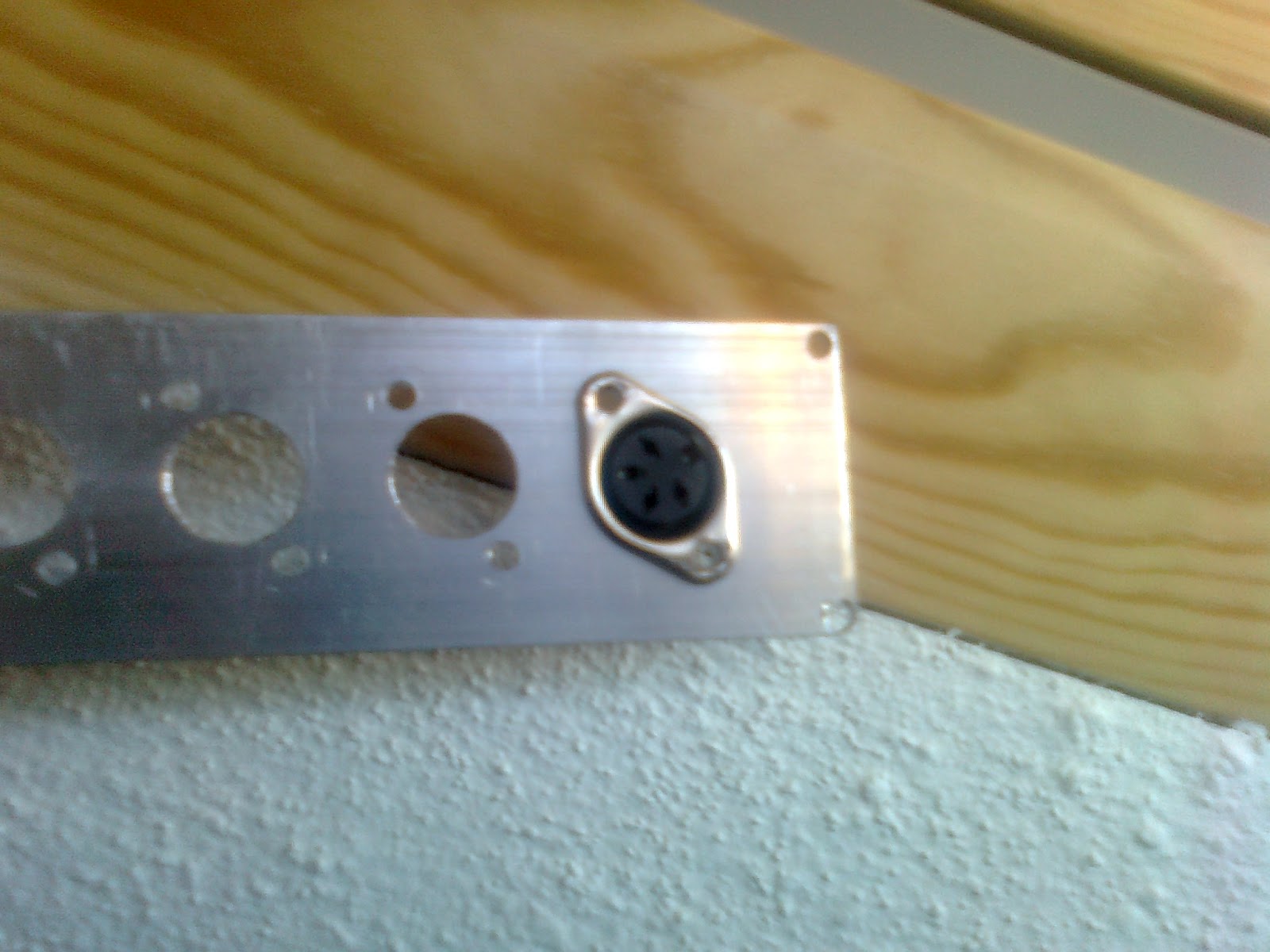 |
| 4-pin DIN panel connector |
After I riveted the aluminium plate in the case all that is left I to solder the wires and rivet the connectors to the plate, but you can get the general idea.
Check it out. ;-)
 |
| Riveted front panel |
 |
| Almost finished box |
Subscribe to:
Comments (Atom)